Announcements

  1. Activity Log

    New Feature

    X21 is making it easier to understand changes in excel models.

    Excel models are rarely started-and-done in a single session, instead they evolve over time. We all know the reality of things: model_v2_final_version5.2_REAL_FINAL.xlsx

    Common Pain Points

    Did you ever ask yourself questions such as:

    • How should I update my manager about the new version?
    • What are changes by colleagues while I was gone?
    • Client send us their new financial model from last month: did they change anything structural beyond this month data?
    • I'm reviewing changes from my analyst and wondering whether they executed all requests?
    • Reminder: What did I change last in this file when I updated it 6 months ago?

    Solution: X21 Activity Log

    Basically X21 can compare different versions of your excel files and summarizes the changes in an easy to understand way.
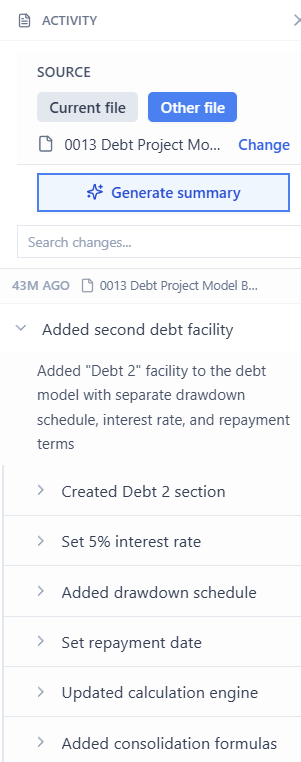
    image

    There are two ways to run it:

    Compare 2 files (manual)

    1. Open the most recent version of the file
    2. Click "Activity Log" in the X21 Chat
    3. Click "Source" > "Other File" and select the version to compare with
    4. Click "Generate Summary"

    Compare the file to itself (automatic)

    1. Click "Activity Log" in the X21 Chat
    2. Enable "Save milestone copies" - This will automatically save copies of your workbook changes. Copies are stored locally on your device whenever you save the file.
    3. (Do some changes)
    4. Click "Generate Summary"

    Then any time to want to understand the changes you can generate a summary.

    Addtionally you can also ask the X21 chat "what did I change in the assumptions last 3 weeks" if you are interested in a particular area.
  2. 1.7.0 - Multiple Files, Track Changes & Follow-up Questions

    Announcement
    Fix

    Summary

    • Work across Excel files - reference other open Excel files using the @ syntax
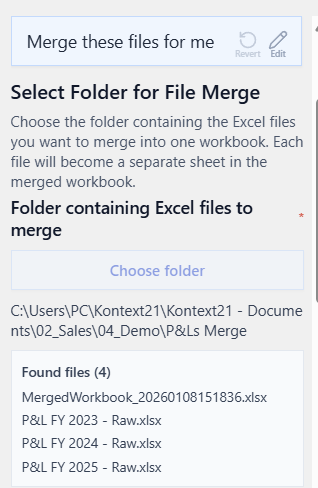
    • Merge files - let's you combine all .xlsx files from a folder into a single file
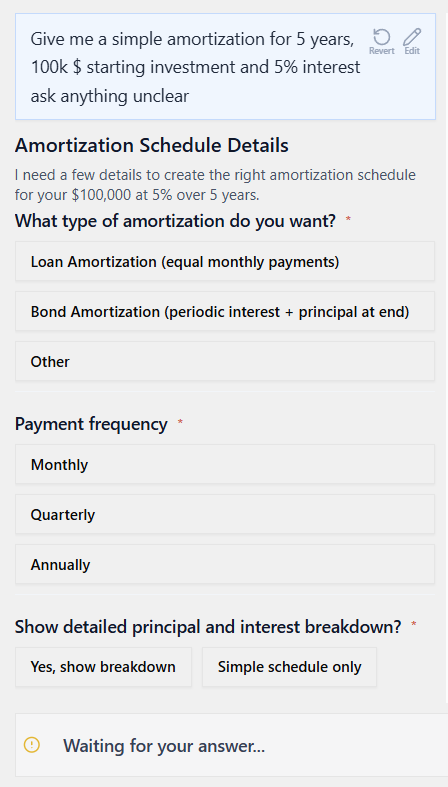
    • Questions interface - let's the AI ask back questions in a more structured way
    • Activity Log - log of changes made based on comparison with past versions of the file

    Minor Changes

    • Generate formulas on the UI language of excel
    • Stricter requirements for assumption references - less hardcoded assumptions
    • Ctrl+Shift+A returns focus to Excel when in X21 chat
    • isActiveSheetEmpty flag and update related prompt - less waiting for read_values on empty sheets
    • Bug: UI Stuck with "Finishing applying formating"

    Work across multiple Excel files

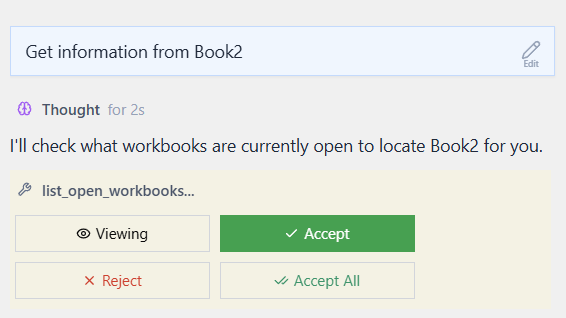
    X21 can now work with all open Excel files. Simply prompt the LLM

    Get the information from my OtherFile

    X21 will then ask permission to list/access the other open files first.

    image

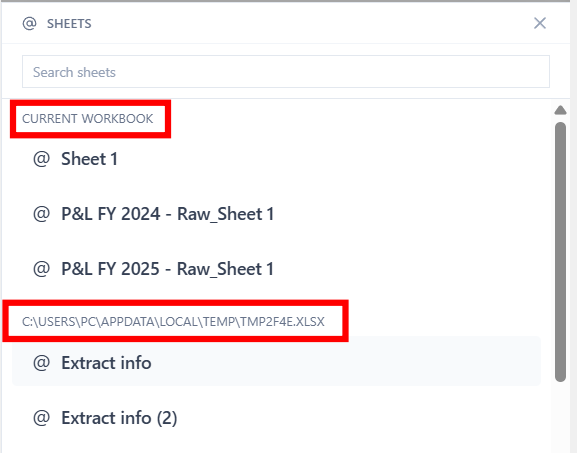
    Alternatively you can reference open sheets from other files directly by typing @MySheet_FromOtherFile or select it from the list:

    image
    3

    Support multiple files

    Can it compare excel files? e.g. I download the quarterly series from other banks and notice that they cheat: they change previous data in new statements. Secretly hiding the error in reporting. Can it compare excelsheets? Uses it the excel functionality?

    Arjen
    In Development

    1

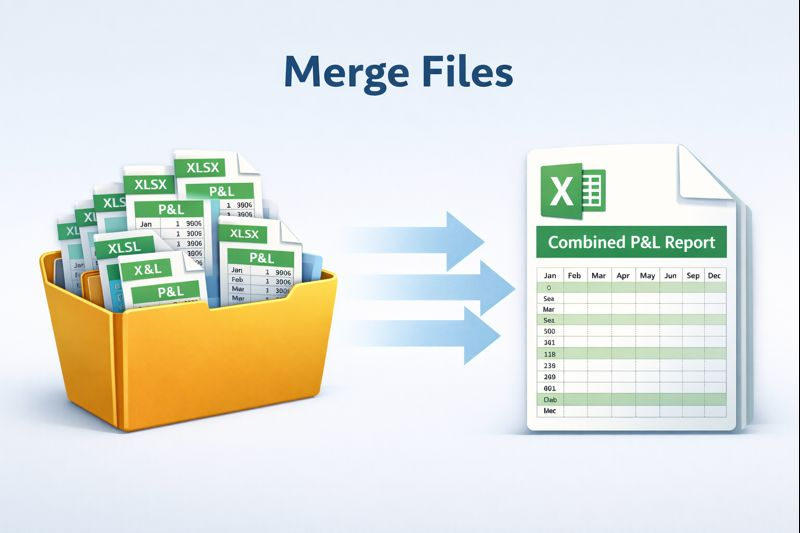
    Merge multiple Excel files

    image

    Say you received 12 individual files with monthly P&L data you can now ask X21

    Merge these 12 files for me

    Select the folder and receive a combination of all sheets in a single file.

    image

    Follow-up questions interface

    The AI can now collect more input from you and questions in a structured way by providing a form and answering options.

    image
    1

    Prompt Generator

    Allow my to define a prompt generator / expert that helps to ask good questions + write great prompt

    Simon

    0

  3. Speeds & Commands - 1.6.1

    Improvement
    Fix
    Announcement
    New Feature

    Performance & Data Generation

    • Faster generation for long changes
    • Faster formatting πŸŽ‰we have disabled reverting formatting though
    • Improved accuracy through better prompting
    • Auto-fit width of modified columns

    Commands & Discovery

    • New default commands
    • Top 5 commands are shown for easy discovery

    User Interface Improvements

    • New questions UI
    • Better status indicators
    • Restore keyboard navigation for previous prompts
    • Improved range selection behavior

    Other

    • OpenAI & Azure Integration
    • Handle missing X21_Commands worksheet gracefully

  4. 1.6.0

    Announcement
    Fix
    Improvement

    Chat Rework

    • New UI Styling & Rendering
    • Improved displaying markdown
    • Keyboard shortcuts - Better Keyboard shortcuts to toggle focus between excel and chat

    Conversation History

    • Re-use old prompts
    • Load older conversations
    • Either for current file all all files
    • Use Up/Down Arrow to quickly load your last command

    Commands & Custom Commands

    • Use frequently used commands that we drafted like /clean_up or /formula_help
    • Store your own commands inside a X21_Commands excel sheet via X21 > Commands

    Excel Range Selection

    • add current selection to prompt via +
    • use @ syntax to reference a different sheet
    • Fixed the Excel range hyperlinks to be always clickable

    Video

    Other

    • Do you have issues with empty chat when switching monitors? Recreate task pane with ctrl+alt+r or change the size of excel
    • X21 restarts backend stopped
    • Started documentation docs.kontext21.com
    • Added a dedicated changelog button
    • Show rejection reason in conversation

  5. Drag Tool - v1.1.4.19

    Announcement
    Fix
    New Feature
    Improvement

    New features

    • Drag tool allows X21 to "Excel drag" a range to extend it's formulas & formats

    Smaller changes

    • Showing selected range in chat window
    • Support international characters (in cells, sheet and file names)
  6. v1.1.2.4

    Fix
    • Better Apply/Revert state management
    • Show API errors in Chat
  7. PDF to Model - v1.1.2.2

    New Feature
    Fix
    Announcement
    Improvement

    New Features

    • PDF files can be added as context
    • Adding thumbs up/down feedback in AI Chat
    • Stop Button
    • shortcut Ctrl+N starts new chat (when X21 pane has focus)

    Smaller Changes

    • Tutorial and Feedback Buttons
    • "Apply" appeared even though there was nothing to apply
    • task pane title 'X21' prefix instead of AI Chat